Help friends – Wi-Fi Hotspot for Windows

Share your Internet with them for free.

Are you waiting guests but don’t have a router? No problem! Just share the home internet connection from your PC or laptop with them for free.

Or save money while traveling with your friends by just using one Internet connection for all instead of paying for each device.

It’s possible with free product Wi-Fi Hotspot for Windows.

Advantages

  • Auto configuration

    It auto configures Wi-Fi hotspot just after installation. You are always able to change any settings and auto-configure it again in case of environment change.

  • Various hotspot methods

    It can be chosen from Tethering, Wi-Fi Direct, Hosted Network or Ad-Hoc to achieve the best result.

  • Wi-Fi adapter choosing

    In case of several installed adapters there is a way to choose an appropriate one.

  • Sleep mode support

    It restores hotspot if it was active before sleep mode

  • VPN integration

    Lite VPN integration allows to use it little easier.

  • High Security

    It uses the highest security standard WPA2 for your safety. On Windows® Vista® and lower WEP standard is used.

  • Resources saving

    Special technology has been used while developing this program that uses very small amount of system resources. No additional system services, no big frameworks are used.

  • Legacy support

    This tool is compatible to Microsoft® Windows XP/2003® SP3 and newer versions.

Download for free About product… 

More information can be discovered in the original post about Help friends – Wi-Fi Hotspot for Windows and on the main site.

Break the system! – Wi-Fi Hotspot for Windows

Give one Internet connection to many devices for free.

For example, save money while traveling by just sharing one Internet connection with your other devices instead of pay for each one.

It’s possible with free product Wi-Fi Hotspot for Windows.

Advantages

  • Auto configuration

    It auto configures Wi-Fi hotspot just after installation. You are always able to change any settings and auto-configure it again in case of environment change.

  • Various hotspot methods

    It can be chosen from Tethering, Wi-Fi Direct, Hosted Network or Ad-Hoc to achieve the best result.

  • Wi-Fi adapter choosing

    In case of several installed adapters there is a way to choose an appropriate one.

  • Sleep mode support

    It restores hotspot if it was active before sleep mode

  • VPN integration

    Lite VPN integration allows to use it little easier.

  • High Security

    It uses the highest security standard WPA2 for your safety. On Windows® Vista® and lower WEP standard is used.

  • Resources saving

    Special technology has been used while developing this program that uses very small amount of system resources. No additional system services, no big frameworks are used.

  • Legacy support

    This tool is compatible to Microsoft® Windows XP/2003® SP3 and newer versions.

Download for free About product… 

More information can be discovered in the original post about Break the system! – Wi-Fi Hotspot for Windows and on the main site.

New version 2.6.1 released – Post .DOCX Source for WordPress

Significant quality improvements. See the details below. And you can always see full change log of Post .DOCX Source for WordPress.

Last changes

Improvements

  • Behavior changes notification warning.
  • Columns’ break support.
  • Connection with translations with the same slugs.
  • Error catching improved.
  • Separated styles properties.

Fixes

  • Gutenberg: Some blocks show warning if use all document’s formatting.
  • List sub-item’s indent.
  • Lists are not applied if style is “Header”.
  • Lists that broken with additional paragraphs are converted incorrectly.
  • Page break inside other tags.
  • Raw attributes: ‘style’ and ‘class’ merging.

Download for free About product… 

More information can be discovered in the original post about New version 2.6.1 released – Post .DOCX Source for WordPress and on the main site.

New version 2.6 released – Post .DOCX Source for WordPress

Support for new items and improved quality.

Behavior changes

  • Font sizes are now imported by default (can be changed in settings).
  • Tables now import vertical cell alignment.
  • Improved footnotes formatting.

See the details below. And you can always see full change log of Post .DOCX Source for WordPress.

Last changes

Improvements

  • Behavior changes notification warning.
  • Columns’ break support.
  • Font sizes support.
  • Old format numbering lists by are supported.
  • Tab’s indent support.
  • Table: Cell vertical alignment support.

Fixes

  • Footnotes’ backlinks are on newline.
  • JS error when process too large documents.
  • JS scripts failed to load on some environment.
  • Lists that broken with additional paragraphs are converted incorrectly.
  • Theme’s custom bullets conflict with DOCX custom bullets.

Download for free About product… 

More information can be discovered in the original post about New version 2.6 released – Post .DOCX Source for WordPress and on the main site.

New version 2.5.1 released – Post .DOCX Source for WordPress

Quality improvement. See the details below. And you can always see full change log of Post .DOCX Source for WordPress.

Last changes

Fixes

  • In the admin panel, the warning ‘Undefined index’ is shown, if DEBUG mode is enabled.
  • JS code error at indents treatment.
  • Paragraph is missed if contains page-break as last element.

Download for free About product… 

More information can be discovered in the original post about New version 2.5.1 released – Post .DOCX Source for WordPress and on the main site.

How to Install or Import a Root Certificate in Windows

Root certificates are public-key certificates that help your system determine if a website or program is genuine and is based on whether the licensing authority is trusted and whether the digital certificate remains valid.

If the digital certificate does not belong to a trusted authority, you will receive an error message in the form “There is a problem with the security certificate”, and the system may block the connection to the website or the launch of the program for your safety.

There are many certificate authorities, among which the most famous are Symantec® and Comodo®. And their root certificates are always freely available for download.

Windows has built-in certificates and automatically renews them. However, you can still optionally manually add additional root certificates to Windows from trusted certificate authorities (CAs).

This is just done in a few steps. The method is suitable for all versions of Windows.

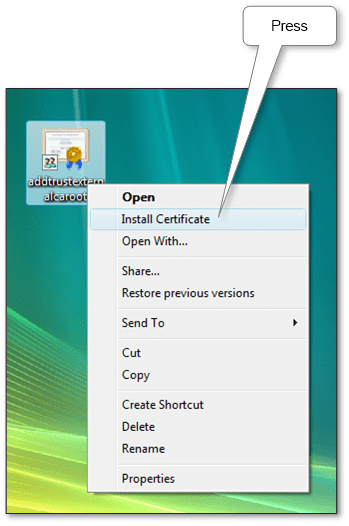
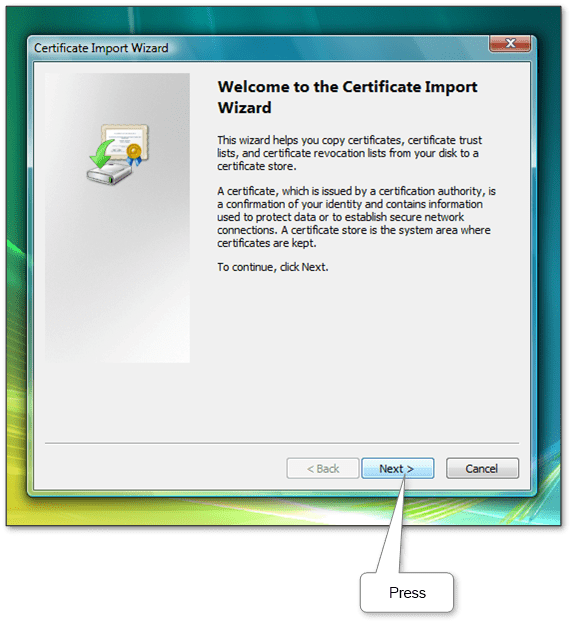
  1. On the downloaded root certificate file, right-click and select the ‘Install Certificate’. In the window that opens, the installation wizard press ‘Next’.

    A screenshot of a computerDescription automatically generated

    A screenshot of a computerDescription automatically generated

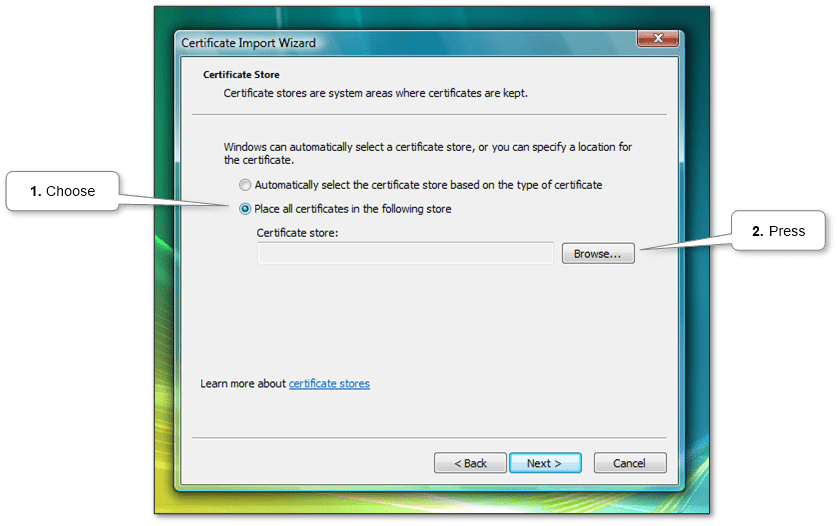
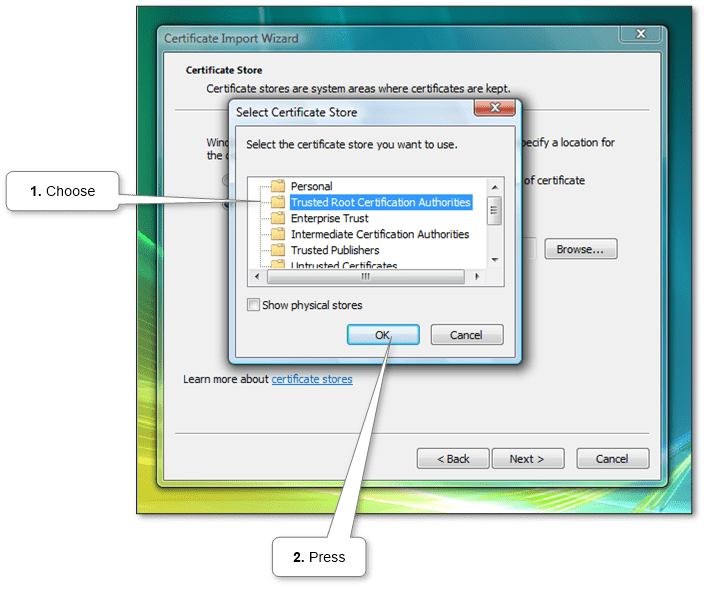
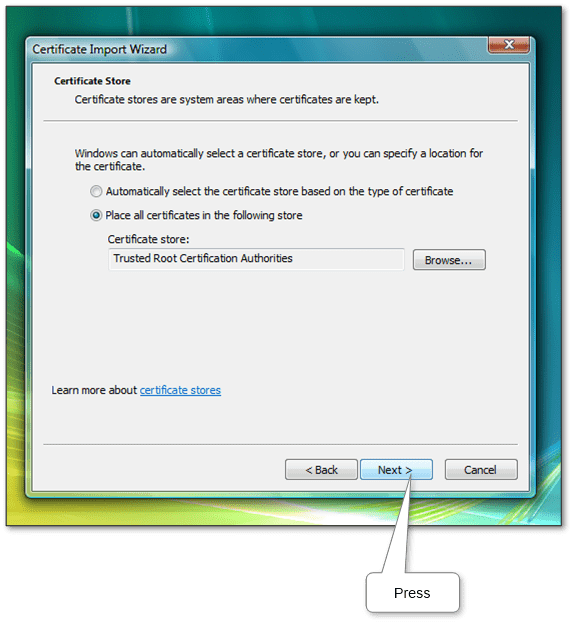
  2. Next, you need to choose the right place to import – Trusted Root Certification Authorities.

    A screenshot of a cell phoneDescription automatically generated

    A screenshot of a cell phoneDescription automatically generated

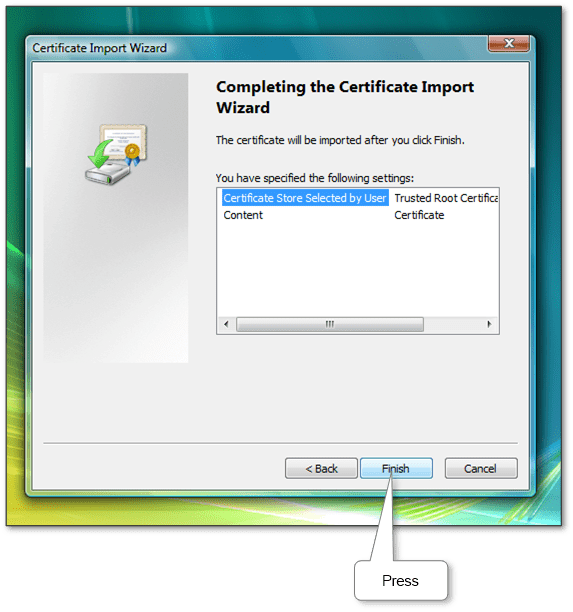
  3. Then just continue the proposed steps of the wizard.

    A screenshot of a cell phoneDescription automatically generated

    A screenshot of a computerDescription automatically generated

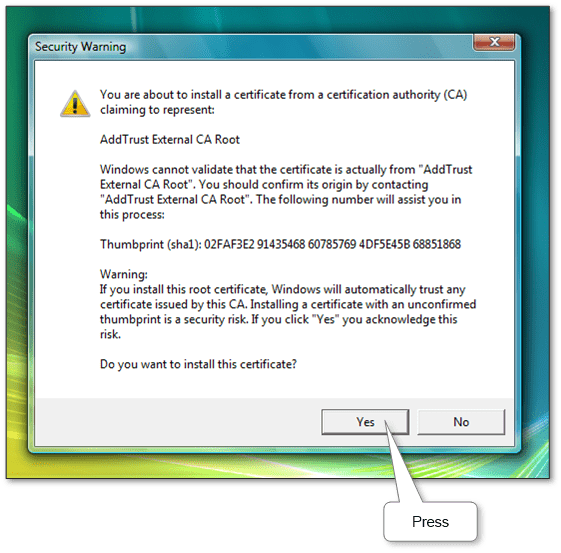
  4. As a result, you need to confirm the installation of our certificate.

    A screenshot of a computerDescription automatically generated

    A screenshot of a cell phoneDescription automatically generated

Now all is done. Websites and programs authenticated by this root certificate will now work fine.

More information can be discovered in the original post about How to Install or Import a Root Certificate in Windows and on the main site.

New version 1.1.3 released – Bulk Discounts for Woo­Commerce for WordPress

The name is corrected and compatibility with Woo 4 is checked. See below. And you can always see full change log of Bulk Discounts for Woo­Commerce for WordPress.

Last changes

Improvements

  • Title update.
  • WooCommerce 4.0 support.

Download for free About product… 

More information can be discovered in the original post about New version 1.1.3 released – Bulk Discounts for Woo­Commerce for WordPress and on the main site.

How to check Windows version

Sometimes you need to find out which version of Windows installed on a computer, laptop or tablet. For example, some programs and computer hardware will only work with a specific version of Windows®.

You may also need to find out if it’s time to upgrade. Microsoft usually supports each version of its operating system for about ten years, and for example, “extended Support” for Windows 7 ends January 14, 2020.

It is very easy to do. The method is suitable for all versions.

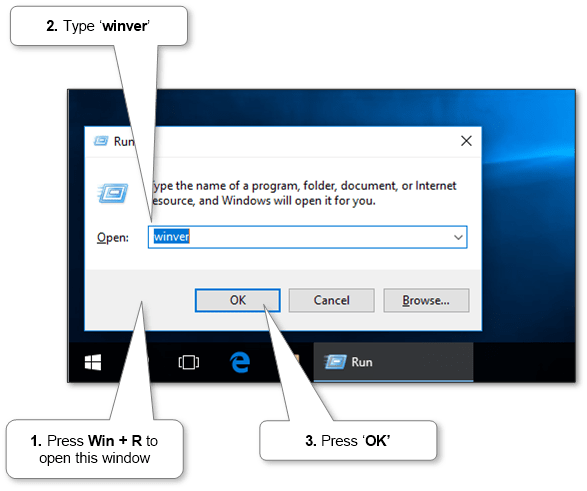
  1. Press Win + R. The following window will open (see image below).

    run

  2. Type ‘winver‘ in the field and click ‘OK’ or press Enter.
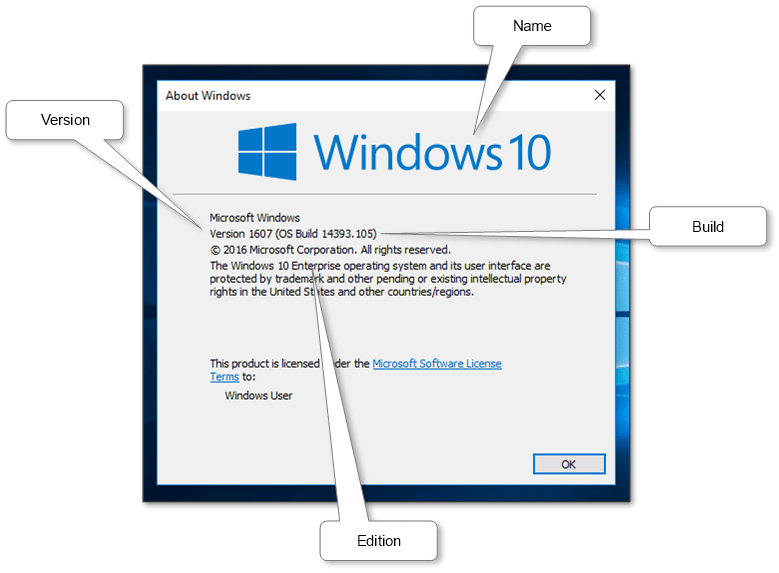
  3. A window will open with information about the name, version, edition and build (see image below).

    winver

More information can be discovered in the original post about How to check Windows version and on the main site.

New version 1.1 released – Wi-Fi Hotspot for Windows

Now, automatic configuration fully installs the system environment for your convenience. Hotspot type (method) now can be chosen. Full compatibility from last versions of Windows 10. Also, stability is greatly improved. See below. And you can always see full change log of Wi-Fi Hotspot for Windows.

Last changes

Improvements

  • Applying sharing significantly improved.
  • Auto-refresh connections.
  • Lite VPN intergation.
  • Special tray icon for Windows 10.
  • Turning on disabled Wi-Fi and Shared devices.
  • Wi-Fi Direct support (Windows 10).

Fixes

  • Checkboxes do not end phrases under Classic OS style.
  • Crash when getting error text from the system that contains placeholders.
  • Crash: Text link disappear while processing command.
  • Crash: Windows 10 set sharing.
  • Handle error is shown if service was restarted.
  • Hosted Network sometimes doesn’t start.
  • If Hosted or Direct adapters are disabled, then HotSpot doesn’t start.
  • If HostedNetwork has been never inited, large number of maxpeers might be saved incorrectly.
  • Inactive adapters interfere with DHCP configuration.
  • Incompatibility with Windows 10 Tehtering.
  • Kernel: Null values cause to wrong memory cleanup.
  • Link UrlWlanPackage isn’t actual.
  • When saving sharing settings, sometimes it gives an error 0x80040201.
  • When uninstalling immediately after installation, the EXE is not unloaded.
  • Windows 10: Connlim not saved in Hosted Network.
  • Windows Vista: Sometimes hotspot system settings are not readable.
  • Windows shows SmartScreen protection window and blocks run.

Download for free About product… 

More information can be discovered in the original post about New version 1.1 released – Wi-Fi Hotspot for Windows and on the main site.

New version 1.1.2 released – Bulk Discounts for Woo­Commerce for WordPress

Stability has been improved. See below. And you can always see full change log of Bulk Discounts for Woo­Commerce for WordPress.

Last changes

Improvements

  • Checkboxes inner select links are now in Combo style.
  • Download Preview and Full bundles by current version.

Fixes

  • “Key” link after “Order” button is invalid.
  • In rare cases admin UI is blocked.
  • In the admin panel, the warning ‘Undefined index’ is shown, if DEBUG mode is enabled.
  • Inline comboboxes too short in WP 5.3 or higher.
  • PHP 5.4 ’empty’ operator compatibility.
  • Settings are erased when editing not from product’s editor.
  • Settings layout is too wide on some themes.
  • Unable to upgrade Extended and Premium version.

Download for free About product… 

More information can be discovered in the original post about New version 1.1.2 released – Bulk Discounts for Woo­Commerce for WordPress and on the main site.
Design a site like this with WordPress.com
Get started