New version 2.0.2 released – Typing Assistant for Windows

Text correction and translation quality increased. See below. And you can see full change log of Typing Assistant for Windows.

Last changes

Improvements

  • Some words added to the dictionary.

Fixes

  • Installer: Checking launch under administrator account.
  • Translater: ‘&’ symbol in text breaks further text while Google (Demo) using.

Download for free About product… 

More information can be discovered in the original post about New version 2.0.2 released – Typing Assistant for Windows and on the main site.

New version 2.3.3 released – Post .DOCX Source for WordPress

Styles properties and SEO plugins support. See the details below. And you can always see full change log of Post .DOCX Source for WordPress.

Warning! Now paragraphs’ spacing and line height properties are imported by default. To manage this behavior, please, use new special settings.

Last changes

Improvements

  • Colored rects support.
  • Document styles’ attributes support.
  • RankMath SEO support in in-place editor.

Fixes

  • ‘Yoast SEO’ title and description setting doesn’t work in editor in later versions.
  • If Gutenberg and Classic editors are activated at the same time, the plugin and Yoast SEO do not work together.
  • Paragraph alignment isn’t applied to raw HTML.

Download for free About product… 

More information can be discovered in the original post about New version 2.3.3 released – Post .DOCX Source for WordPress and on the main site.

New version 2.0 released – Typing Assistant for Windows

Build-in translator and correction based on hundreds of thousands of words. See below. And you can see full change log of Typing Assistant for Windows.

Last changes

Improvements

  • Abbreviation switching – only if typed in capital.
  • Added dictionaries EN, RU, DE.
  • Contextual selected text translation in any application.
  • Installer’s wizard: the page for sending correctable words.
  • Translation with preserving text formatting.
  • Translator with provider support.

Fixes

  • Adobe products: Changing the layout of the selected text inserts the last value from the clipboard.
  • Auto switch inside the typed word.
  • Balloon on controls sometimes disappears immediately.
  • Case sensitive words are not case sensitive.
  • Checkboxes do not end phrases under Classic OS style.
  • Console: Current keyboard layout not detected.
  • Does not switch layouts again on selection.
  • Doesn’t work in Adobe products.
  • EULA for RU not in Russian.
  • Edge: The current layout is always defined as ‘en’.
  • No auto-switch when erasing already entered characters through Backspace.
  • On some systems, auto-switching layouts does not have time to work.
  • Outlook: When changing the first letter in the bullet, a warning about multilingual input is shown.
  • Password entry fields not detected.
  • PowerShell: The current layout is always defined as ‘en’.
  • VMWare: Processes clicks inside a VM.
  • When uninstalling immediately after installation, the EXE is not unloaded.
  • White background under RichText on dialog.
  • Win7 x64: click on balloon does not work.

Download for free About product… 

More information can be discovered in the original post about New version 2.0 released – Typing Assistant for Windows and on the main site.

Windows XP Development

Our company still supports Windows XP. Why? It’s a fast, stable and secure (with appropriate settings) operating system. There are still users that looking for Windows XP software for their old PCs and laptops. Furthermore, some companies have this operating system installed on their infrastructure due to it does work well and it is no so effective to migrate to upper versions.

windows-xp-market-share-worldwide

According to the above statistics, many users will still use this great OS. More details can be found here.

Our products

We love this OS. Our products work well with Windows XP such as Wi-Fi Hotspot and Typing Assistant.

Custom development

Our technologies are compatible with Windows XP as well. So, if you need some development for this OS – welcome to contact us.

More information can be discovered in the original post about Windows XP Development and on the main site.

New version 2.3.2 released – Post .DOCX Source for WordPress

Usability improvements and stability increase. See the details below. And you can see full change log of Post .DOCX Source for WordPress.

Last changes

Improvements

  • Global document ID binding support.
  • Log items now contain help links.
  • Log: List of all found separated attributes.
  • Unexisted links now is just checked by default.

Fixes

  • In-place edit: Custom post type: Unable to find tags block.
  • In-place edit: EWWW Image Optimizer shows warnings about dummy.jpg.

Download for free About product… 

More information can be discovered in the original post about New version 2.3.2 released – Post .DOCX Source for WordPress and on the main site.

Three steps to create a website with multi-pages

How to make a website yourself, and even for free? You always have to start somewhere. This topic will be about sites, and not about landing pages (landing pages), although filling them is not a problem. If you need a website that involves filling with various content, then this material is for you.

There are steps to create a website listed below.

Choosing Platform

The first thing to decide is the site engine, or CMS (Content Management System). Online solutions for building landings or simple business cards do a poor job of this. There are many free engines on the market that allow you to create professional websites, and which, at the same time, are easy to manage.
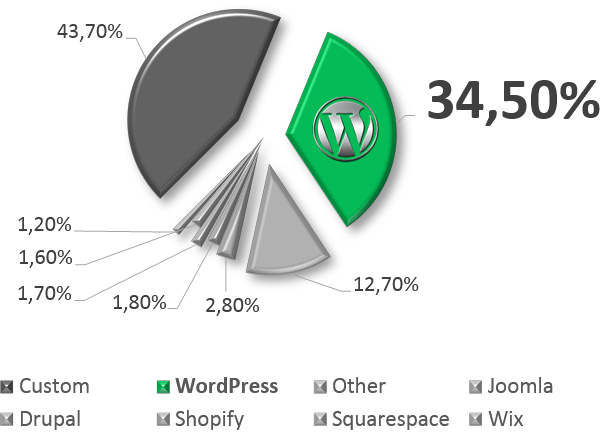
wordpress-market-share-worldwide

One of these is WordPress to create any website. This is a very popular platform – now more than 34% of the total world number of sites are made on it. Choosing WordPress, you will not have to change it for anything for a very long time – it is quite flexible and expandable.

wordpress-market-grow

WordPress installation itself takes literally 5 minutes. Do not forget that there are specialized hosting services preloaded with WordPress CMS and optimized for quick work.

Choosing Address and Location

Next, you need to decide where the site will be located and at what address it can be found. The location of the site is hosting (the server on which the files of your site will be physically placed). The site address is its domain name like http://www.mysite.ru.

The site address is selected once, and it is should be chosen responsibly. But, hosting can be easily changed at any time as your needs increase. If you do not want to do this by yourself, it will not be difficult to find a specialist. Moreover, most hosting providers will transfer your site to themselves and do it completely free of charge.

wordpress-platform

Luckily, WordPress provides a special oriented hosting named wordpress.com with free and paid plans. Site name can be also chosen there. It’s an all-in-one box solution covers any needs in blogging and site-building with ultra-high-speed hosting.

Making Materials and Articles

Further, to fill the site, you need to create materials for it. So, how to make a web page? The engine itself allows you to edit pages on the site and fill it with content through a special editor. But there is an easier wayto make site pages right via familiar to all Microsoft Word (or Google Docs or OpenOffice – as anyone is used to).
ms-word-source

Specialists at Seraphinite Solutions created a special free WordPress plugin that allows you to upload prepared documents to the site – Post .DOCX Source. It includes everything you need for a beautiful and proper import of finished materials in WordPress. It allows you to create and format the material in the editor that is familiar and convenient for you, and then, simply uploading the finished DOCX file to the site to get a fully prepared page. Also, a converter from DOCX to HTML is available online, where you can try it without installing anything anywhere.

If you’ve gotten used to it a bit and want to do SEO optimization, then this plugin is adapted for these tasks too.

The plugin has a lot of settings and will allow you to organize convenient work with many authors, as well as significantly reduce the time spent by editors and SEO specialists when posting materials on a site running WordPress. Automatically replacing and generating alt and title tags, resizing and cropping images, adjusting the hierarchy of headers are just a few of the features that make life much easier.

Formulas Support

Of the latest innovations, it supports and the imports correctly Word formulas in WordPress. The plugin allows, without wasting the time, importing and correct display formulas of any complexity in WordPress. That is significantly advantage for science teams and specialists in various fields. The publication of their achievements, the possibility of simple adjustments, and at the same time – the complete absence of the need to adapt to some requirements of third-party software – everything is familiar, standard, and most importantly – simple!

Conclusion

As a result, we have a ready-made website and there is an easy way to publish almost any materials on it. Our task of creating a website for free is completed! Now you can create a website for your business, create your own website using familiar Google or Microsoft tools.

More information can be discovered in the original post about Three steps to create a website with multi-pages and on the main site.

New version 2.3 released – Post .DOCX Source for WordPress

More power! Formulas, crop and resize images, Google Docs direct link support. Full change log: Post .DOCX Source for WordPress.

Last changes

Improvements

  • Batch mode: Total status after processing.
  • Math formulas support.

Fixes

  • Script localization is missed.

Download for free About product… 

More information can be discovered in the original post about New version 2.3 released – Post .DOCX Source for WordPress and on the main site.

How to view and change Microsoft Word document properties

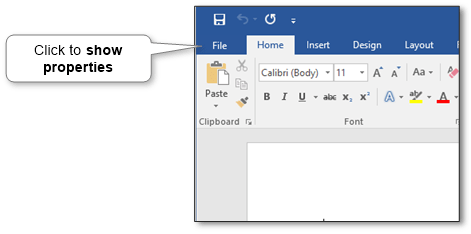
All document’s properties are located under the ‘File’ menu tab in the ‘Info’ section (MS Word document information panel). Look at the picture below.

ms-word-document-properties-location

INTERESTING!Did you know that you can use familiar MS Word or Google Docs to create site’s content via WordPress’s plugin for importing from .DOCX just by one click?Read More

Common properties

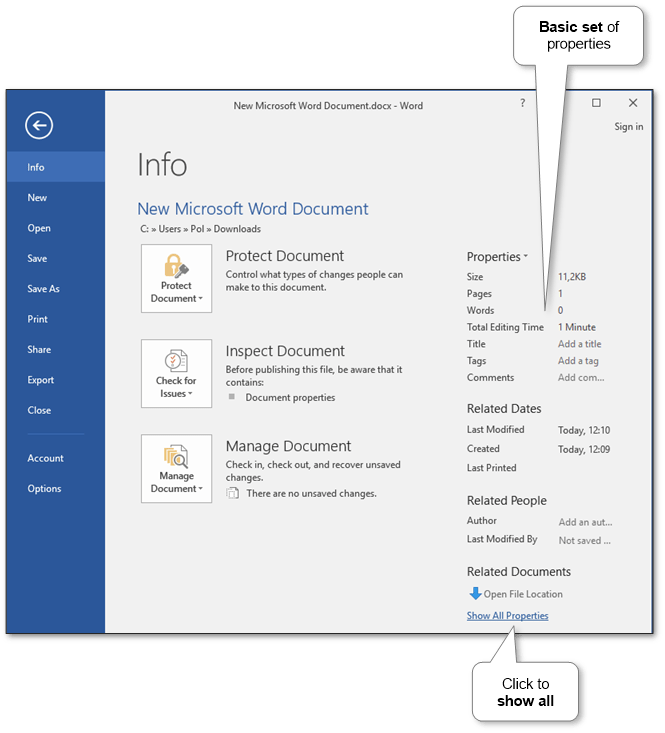
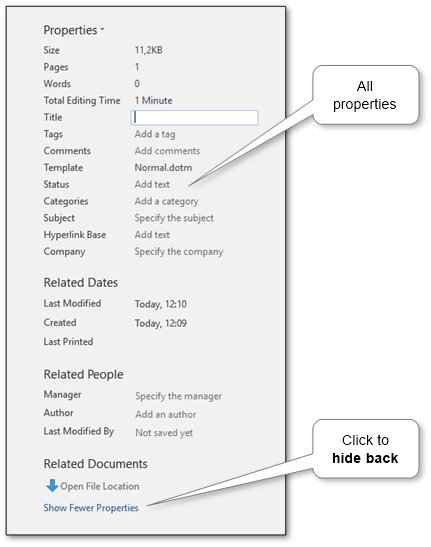
There are a set of common properties such as title, tags, categories, comments, subject, etc. By default, the only basic set is displayed. To show all properties, click the link at the bottom of the window (see the picture below).

ms-word-document-properties

ms-word-document-properties-all

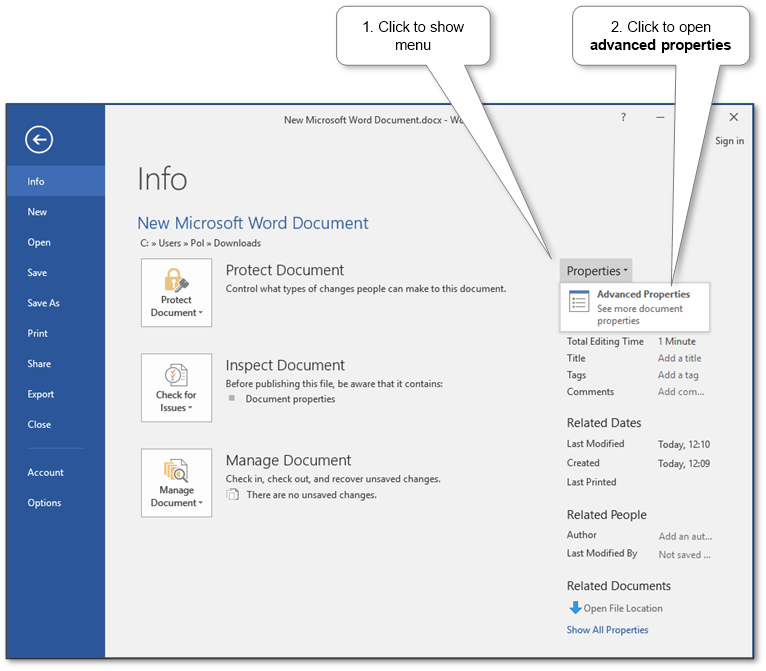
Advanced properties

Also, there are advanced properties that contain general information, some statistics, basic and custom properties.

ms-word-document-properties-advanced-location

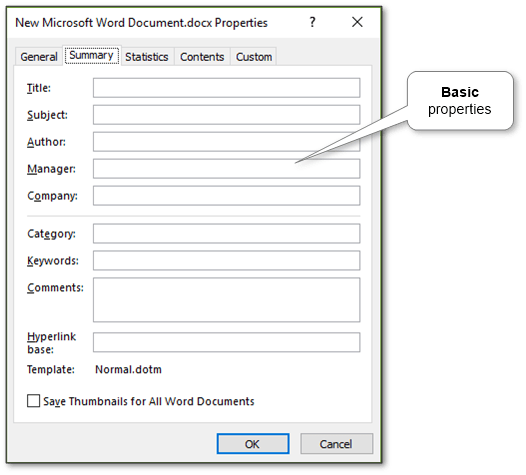
Basic properties

ms-word-document-properties-advanced-basic

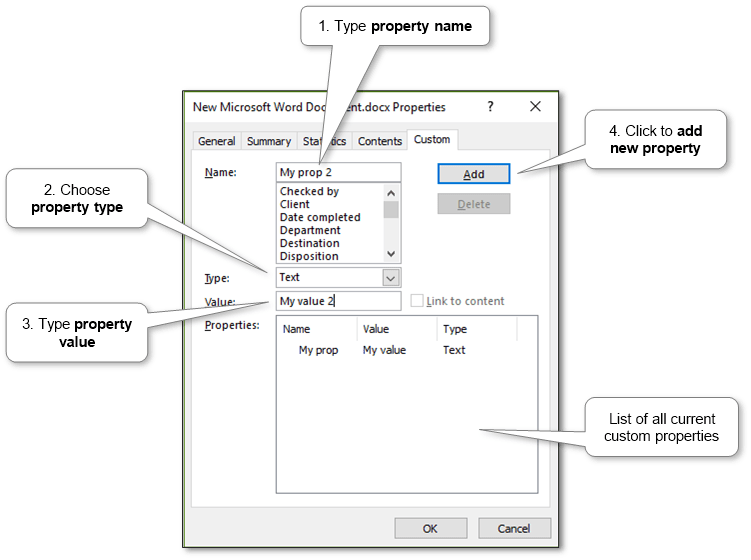
Custom properties

ms-word-document-properties-advanced-custom

More information can be discovered in the original post about How to view and change Microsoft Word document properties and on the main site.
New version 2.0 released – Post .DOCX Source for WordPress

Now it’s more simple in use and more powerful! See below. And you can see full change log of Post .DOCX Source for WordPress.

Last changes

Improvements

  • Additional attributes should be marked with a special style instead of ‘Header 1’.
  • Blockquotes support.
  • Category import case insensitive.
  • Direct mode: Link to edit post in the log.
  • Downlevel subheaders if more that one ‘Header 1’ on page.
  • Download Preview and Full bundles by current version.
  • Embedded body’s images.
  • Image caption support.
  • Images are uploaded in posts’ drafts by default.
  • In-place edit: Advanced settings block is hidden by default.
  • In-place edit: Preview Mode.
  • Log links checking and media processing.
  • Page break support.
  • Tags import case insensitive, check existence.

Fixes

  • “Key” link after “Order” button is invalid.
  • Categories are not set in Gutenberg editor.
  • Footnotes links check fail.
  • List item wrong subcontent.

Download for free About product… 

More information can be discovered in the original post about New version 2.0 released – Post .DOCX Source for WordPress and on the main site.

New version 1.10.1 released – Post .DOCX Source for WordPress

RankMath SEO partial support and some bugfix. See below. And you can see full change log of Post .DOCX Source for WordPress.

Last changes

Improvements

  • RankMath SEO support in batch mode.

Fixes

  • Empty default links target frame produces “a.firstByAttrVal(…).getElementsByTagName is not a function”.
  • PHP 5.4 incompatibility while uploading images.
  • Rarely some URLs are detected as “not found”.

Download for free About product… 

More information can be discovered in the original post about New version 1.10.1 released – Post .DOCX Source for WordPress and on the main site.

Design a site like this with WordPress.com
Get started