Now providing hosting as well

We are pleased to introduce an addition to the Seraphinite Solutions ecosystem – Seraphinite Hosting.

https://hosting.s-sols.com

Our hosting is fully optimized for WordPress + Seraphinite Accelerator, all hosting parameters are optimized for maximum compatibility and speed.

Special offer! 15% discount (until 30/09/2024) by promo code START-HOSTING for new hosting customers.

Hosting is optimized for WordPress but it can use it for all your projects.

More information can be discovered in the original post about Now providing hosting as well and on the main site.

New version 2.21 released – Accelerator for WordPress

Slider Revolution improvements and quality increasing. See below. And you can always see full change log of Accelerator for WordPress.

How to enable smooth loading of Slider Revolution

The most important improvement in this release is smooth loading of Slider Revolution. Previously, any Slider Revolution was loaded with flickering (or double loading) effect.

It is disabled if there was previous version of the product installed – just to preserve the same site behavior. To enable it, the next steps should be done:

  • Existing styles code in item named ‘Revolution Slider‘ in styles settings for corrections for lazy loading scripts should be overwritten with the below one:

    rs-module[data-lzl-layout="fullwidth"], rs-module[data-lzl-layout="fullscreen"], rs-fullwidth-wrap, rs-fullwidth-wrap > rs-module-wrap
    width: var(--seraph-accel-client-width) !important;
    left: calc((100% - var(--seraph-accel-client-width)) / 2) !important;

    .
    rs-module[data-lzl-layout="fullscreen"]
    height: 100vh !important;

    .
    rs-module[data-lzl-layout="fullscreen"].js-lzl-ing
    margin-top: -100vh !important;

  • Related ‘Revolution Slider‘ -> ‘Smooth loading‘ option should be enabled in Videos, frames and content parts settings for corrections for lazy loading scripts.
  • Cache of pages that contain Slider Revolution should be updated.

Last changes

Improvements

  • Adaptation to screen sizes: avoiding already processed images.
  • Carousel of Jet.
  • Logging of server and cloud cache clearing.
  • Manager: Limiting checking HTML only of current site.
  • Menu from SuperFly.
  • Premium Carousel of Elementor.
  • Slider Revolution: Smooth loading.
  • Support for CookieYes.
  • Support for Image Carousel Widget of Elementor.
  • Support for Slider Revolution.

Fixes

  • License cant be deactivated if any error occurs in the process.
  • PHP 8 warnings related to PHPSQLParser.
  • PHP warning about ‘fopen’ can be produced on some hostings.
  • PHP warning about undefined key in $acceptEncodings.
  • Slider Revolution: vertical position of elements may be calculated incorrectly.
  • URLs that contain only dots in path segment can lead to inaccessible cache folder.

Download for free About product… 

More information can be discovered in the original post about New version 2.21 released – Accelerator for WordPress and on the main site.

New version 2.20 released – Accelerator for WordPress

Getting fresh content parts allows to set particular areas of pages to be always fresh (got from server). Also, a cache small timeout can be specified to don’t overload server. E.g. it can be helpful for online stores to show always actual products with prices. Or always actual comments list on blogs. It can be enabled here.

Also, since this version an alternative redirection to WEBP and AVIF is available in case when redirection via server can’t be set. It can be enabled here.

And you can always see full change log of Accelerator for WordPress.

Last changes

New features

  • Getting fresh content parts.

Improvements

  • Alternative redirection to WEBP and AVIF.
  • Reinitializing all configuration files while version upgrading.
  • Support for ‘If-Modified-Since’ request header.

Fixes

  • Unavailable content in ‘Safari’ browser on some sites when go from an external link.

Download for free About product… 

More information can be discovered in the original post about New version 2.20 released – Accelerator for WordPress and on the main site.

New version 2.19.10 released – Accelerator for WordPress

Fixed possible ‘A-HREF’ in URLs in ‘a’ HTML tags. The initial issue is coming from ‘DOM’ library of PHP. It recently changed behavior of processing ‘href’ of ‘a’ tags. Now we adapted our code to support that. For sure, please, update Accelerator to the latest version.

You can always see full change log of Accelerator for WordPress.

Last changes

Fixes

  • Possible ‘A-HREF’ in URLs in ‘a’ tags.

Download for free About product… 

More information can be discovered in the original post about New version 2.19.10 released – Accelerator for WordPress and on the main site.

New version 2.4 released – Bulk Discounts for WooCommerce for WordPress

Better support of variable products and quality improvements. See below. And you can always see full change log of Bulk Discounts for WooCommerce for WordPress.

Last changes

Improvements

  • Changing text ‘Already done’ to ‘Dismiss’ in review notification.
  • Direct link to download full version in upgrade message.
  • On all notifications that requires confirming the close ‘X’ button was removed.
  • Plugin’s custom directory name support.
  • Settings restoring confirmation.
  • Showing discount in prices’ range of variable products.

Fixes

  • Ajax requests could be blocked by another plugins.
  • Can’t update plugin from file if its directory is renamed.
  • Decrypting is not working after changing salts.
  • If discount is less than 2 a sale flash is not shown in variable products.
  • If minimum quantity is set 0 then after reloading it becomes 2.
  • Inline script appears as text while using with Elementor.
  • Plugin’s scripts and styles are loaded incorrectly if WP plugins directory is not under WP root directory.
  • Sometimes Ext, Full versions are updated to Base version.
  • Sometimes error appears about call to undefined function ‘get_plugins’.
  • Sometimes infinite loop in ‘_flt_woocommerce_product_get_price’ filter.

Download for free About product… 

More information can be discovered in the original post about New version 2.4 released – Bulk Discounts for WooCommerce for WordPress and on the main site.

New version 1.3 released – Downloads Statistics for WordPress

A new file interception mechanism that significantly improves speed and security. See below. And you can always see full change log of Downloads Statistics for WordPress.

Last changes

Behavior changes

  • New file interception for speed and security.

Improvements

  • Changing text ‘Already done’ to ‘Dismiss’ in review notification.
  • Direct link to download full version in upgrade message.
  • If EULA is not accepted then showing minimal UI.
  • Import/export of settings.
  • Input-output security improvements.
  • Last access time in ‘Local Database’.
  • Minimum WordPress version is 4.5.
  • On all notifications that requires confirming the close ‘X’ button was removed.
  • Options: Multisite support.
  • Plugin’s custom directory name support.
  • Premium update.
  • Settings restoring confirmation.
  • Support for NGINX configuration files.
  • The support button now opens the site page instead of the email client.
  • Upgrading from free version to full.

Fixes

  • Admin scripts.
  • Ajax requests could be blocked by another plugins.
  • Can’t update plugin from file if its directory is renamed.
  • Cron: Maximum execution time of 30 seconds exceeded.
  • Decrypting is not working after changing salts.
  • Localization is not reloaded on ‘change_locale’ event.
  • Mismatched version is always shown as new.
  • Plugin’s scripts and styles are loaded incorrectly if WP plugins directory is not under WP root directory.
  • Sometimes Ext, Full versions are updated to Base version.
  • Sometimes error appears about call to undefined function ‘get_plugins’.
  • The activation panel is not visible if the server is unavailable.
  • Transferring files is always in binary mode.
  • Unable to upgrade Extended and Premium version.
  • Update terminates due to timeout on some hosting.
  • Updating to full version is not always working.

Download for free About product… 

More information can be discovered in the original post about New version 1.3 released – Downloads Statistics for WordPress and on the main site.

New version 2.17 released – Accelerator for WordPress

Fast optimization of styles during self-learning, extended page exclusions, improved managing, and more. See below. And you can always see full change log of Accelerator for WordPress.

Last changes

Improvements

  • Checking dependent parts of the cache.
  • Fast optimization of styles during self-learning.
  • HTML fixing: adding skipped HTML tag.
  • Option for maximum execution time and pause after skipped optimization.
  • Page exclusions by XPath expressions for content.
  • Showing error in the manager while operations if server state is wrong.
  • Stopping and controlling the execution of optimization tasks.
  • Without lazy revalidation while optimization content is displayed fresh for all requests instead of the first one.

Fixes

  • Sometimes there is an error renaming the temporary CSS file.

Download for free About product… 

More information can be discovered in the original post about New version 2.17 released – Accelerator for WordPress and on the main site.

New version 2.16 released – Accelerator for WordPress

Scheduled cache update and quality improvements. Now particular times with various periods can be defined starting from minute and ending to year. See below.

And you can always see full change log of Accelerator for WordPress.

Last changes

New features

  • Scheduled cache update.

Fixes

  • Sometimes PHP warning ‘Cannot modify header information’ appears in admin mode.

Download for free About product… 

More information can be discovered in the original post about New version 2.16 released – Accelerator for WordPress and on the main site.

Install VPS (Virtual private server) with WordPress

With VPS (Virtual private server) we get more power and full control for quite equal price in comparing with shared hostings. It started from 5$ per month (e.g. Contabo or Server4You). The main disadvantage from shared hostings is requiring installation and configuration.

It looks complicated but it contains only 3 main steps.

  1. Choose and setup server
  2. Install and configure control panel
  3. Deploy WordPress

Choose and setup server

Just choose any liked provider and server type. We recommend to use next providers due to good prices and given power: Contabo (excellent combination of price and German’s quality, and many awards), Server4You (Europe and USA region), OVHCloud, Hostens, CloudWays (Linode is recommended for India region), MakeCloud (Asia and Russia region).

Let’s look at the process in Contabo.

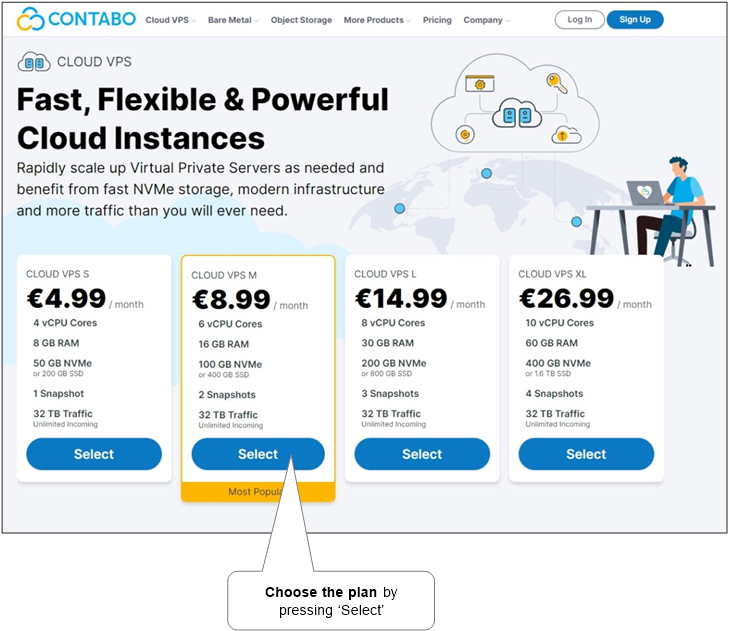
  1. Go to the VPS page (or VDS or VPS with big HDD storage if needed), select the needed plan and click the ‘Select’ button.

    contabo-plans

  2. Next, select the needed set of options. Please, choose Ubuntu as operating system. Also, set root’s login and password – it will be required in further steps. Then, click ‘Next’.
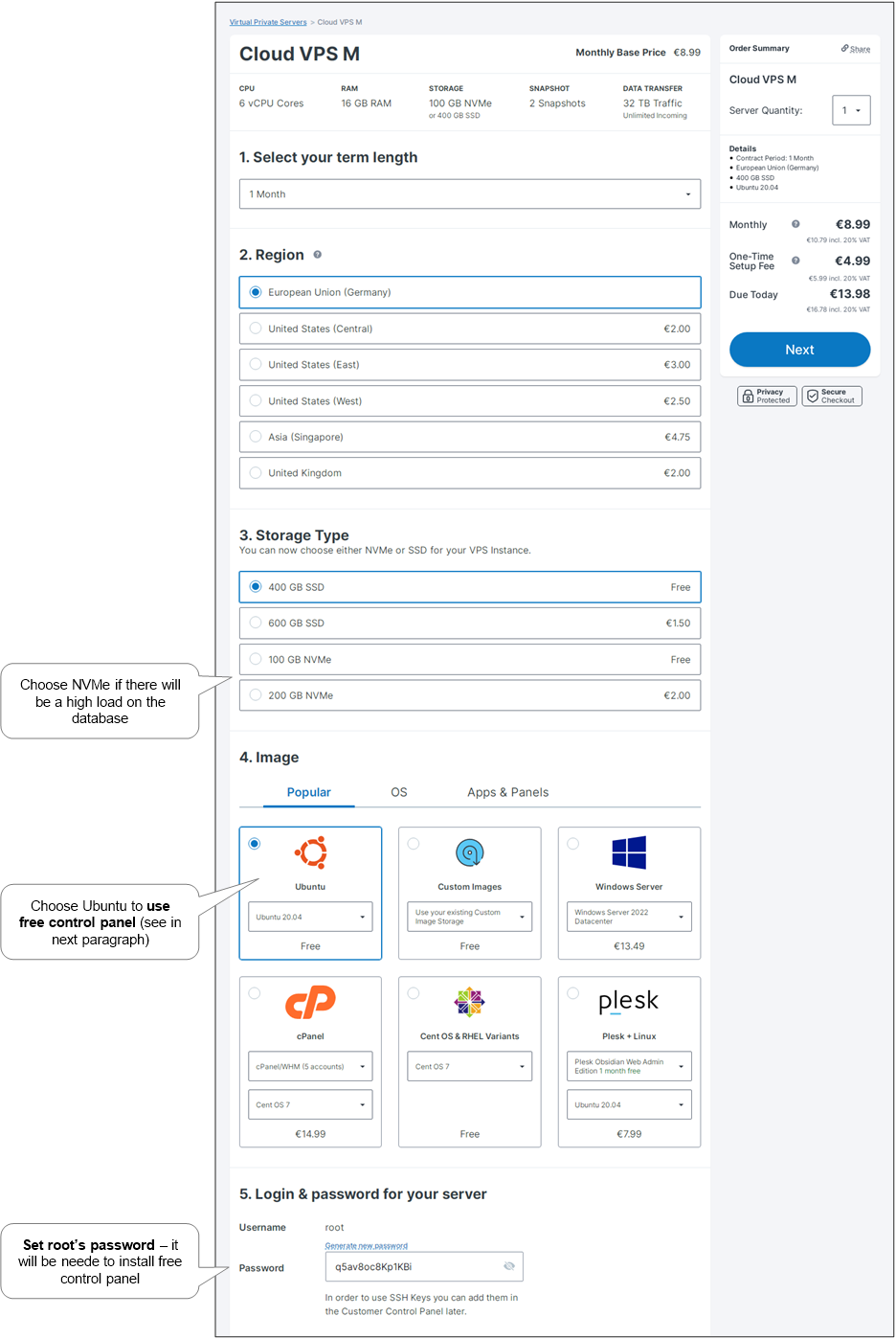
    contabo-options

  3. Do payment (note that the server installation fee depends on the selected payment period).
  4. Now, wait for a letter from Contabo about the completion of the installation and server’s IP address. Now you have become the owner of a VPS server!
  5. Finally, set the new server’s IP address for our site name.
    1. If previous site is needed to be alive while configuring the new one, real DNS adjusting should be done as the last step (after installing WordPress part). And the new IP should be temporary set by using Awesome Host Manager Chrome Extension by adding mapping of IP to domain name.
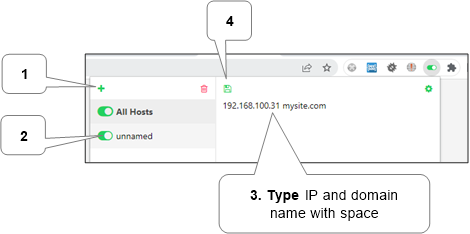
      awesomehostman-settings

      After testing is complete, the temporary mapping should be removed and the next step should be done finally.

    2. Below is how DNS adjusting can be done via CloudFlare for site mysite.com in DNS settings.
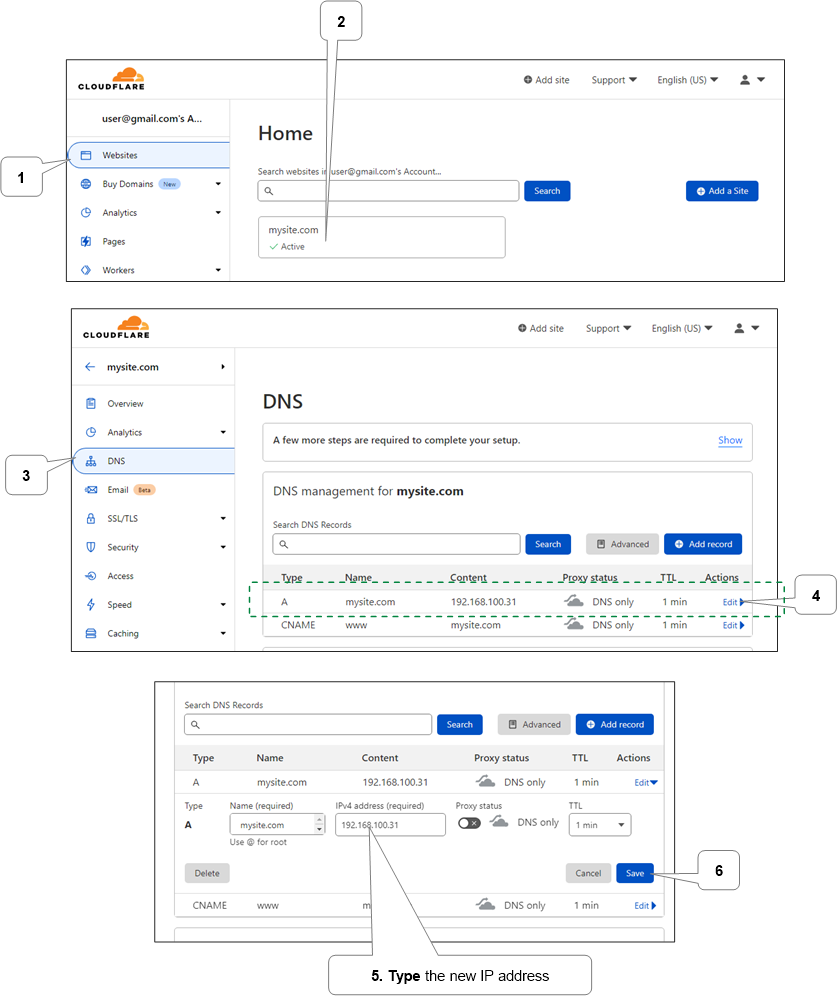
      cloudflare-site-dns-change-ip

Install and configure control panel

To save money, we will install popular free aaPanel that it is very powerful and flexible. FastPanel is also free, but it has smaller features. Also, many hosting providers offer paid control panels like powerful cPanel – it can be definitely used too.

Install

  1. Run any SSH client (Mac, Windows), connect using server’s IP address, and login there using and root’s login and password that were setup while server installation.
  2. Begin installation process by typing below command and pressing enter:

    sudo apt-get update && sudo apt-get install wget && sudo wget http://www.aapanel.com/script/install-ubuntu_6.0_en.sh && sudo bash install-ubuntu_6.0_en.sh

    During installation, please, type y to the question Do you want to install aaPanel to the /www directory now?(y/n) and type yes to the question Do you need to enable the panel SSL? (yes/n).

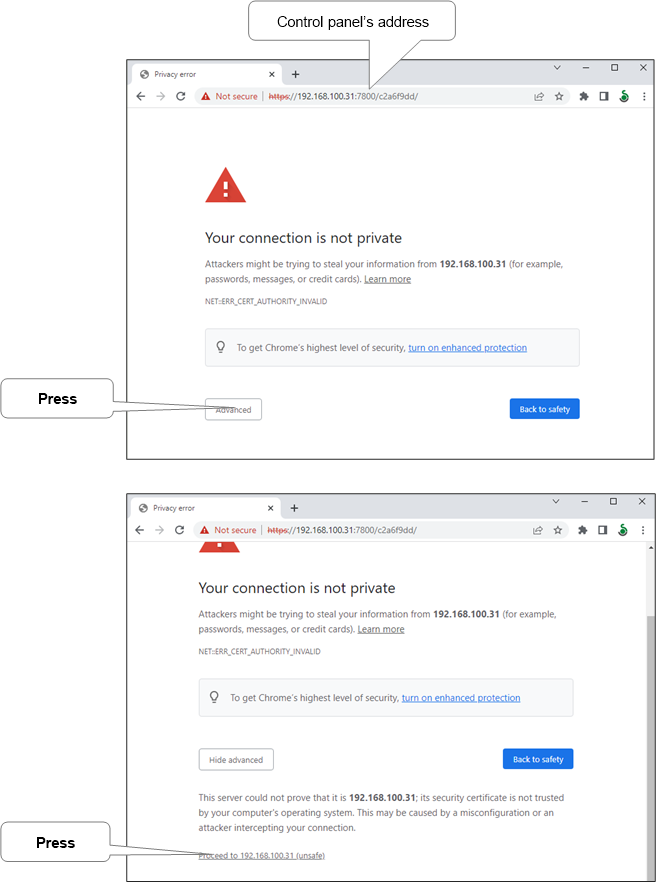
  3. After successful installation, information with a panel’s Web-address, login and password for entering the control panel will be displayed, for example:

    ==================================================================
    Congratulations! Installed successfully!
    ==================================================================
    aaPanel: https://192.168.100.31:7800/c2a6f9dd
    username: abc
    password: ef1e70fe
    Warning:
    If you cannot access the panel,
    release the following port (7800|888|80|443|20|21) in the security group
    ==================================================================
    Time consumed: 2 Minute!

Note. On some hostings (except Contabo), it will be necessary to open the specified ports in the firewall manually.

Configure

  1. aapanel-address

    Then, login to our control panel via provided username and password.
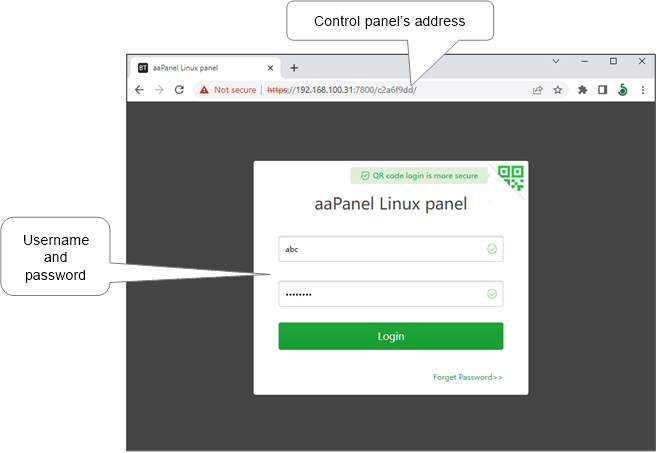
    aapanel-login

  2. Setup packages. Choose default set if not sure.
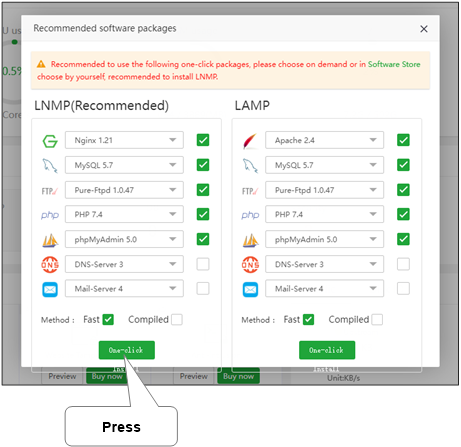
    aapanel-packages-choosing

    Then wait for installation completion. It can take some time, please, be patient.
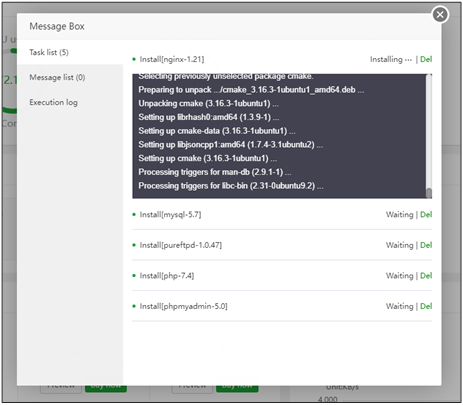
    aapanel-packages-installing

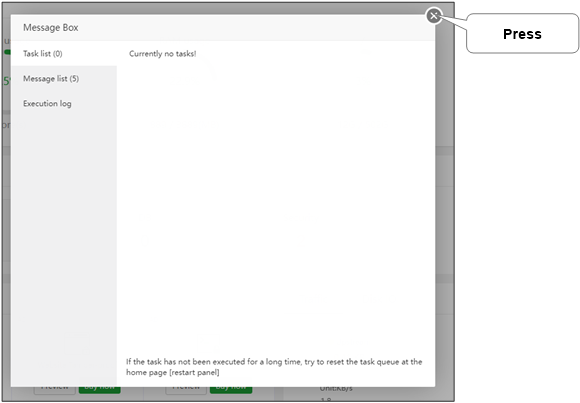
    Now the window can be closed.

    aapanel-packages-install-finished

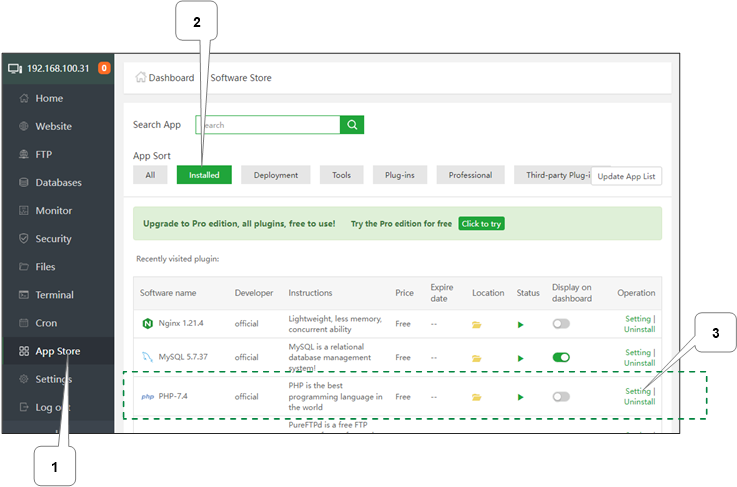
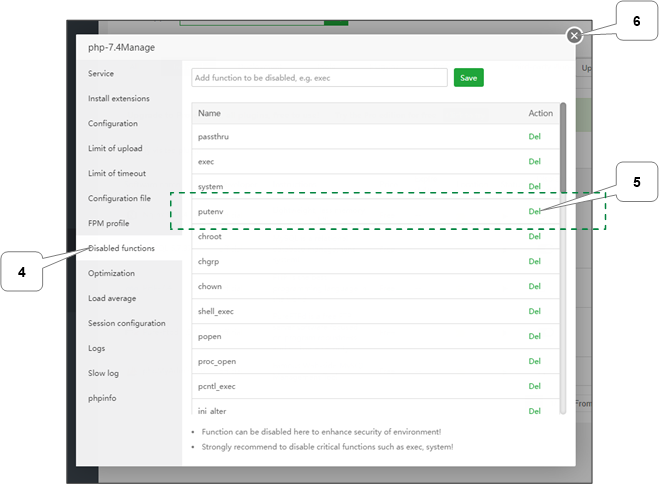
  3. Turn off ‘putenv’ in PHP’s settings.

    aapanel-apps-php-settings

    aapanel-php-settings-disfuncs

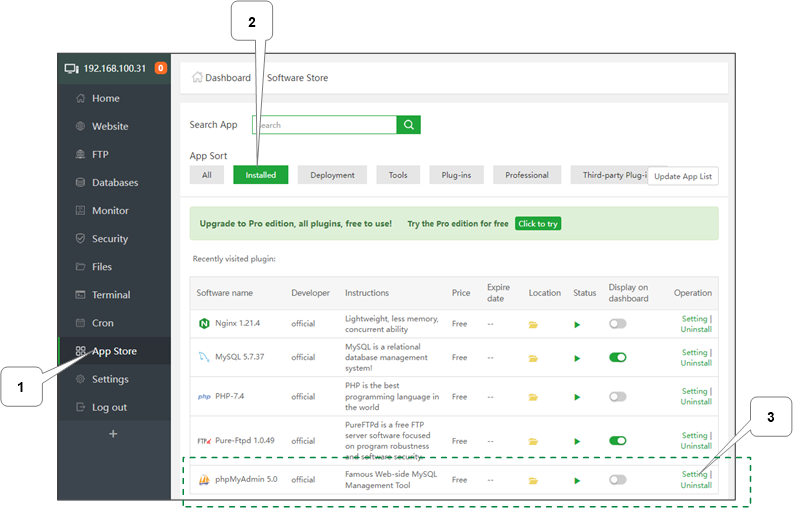
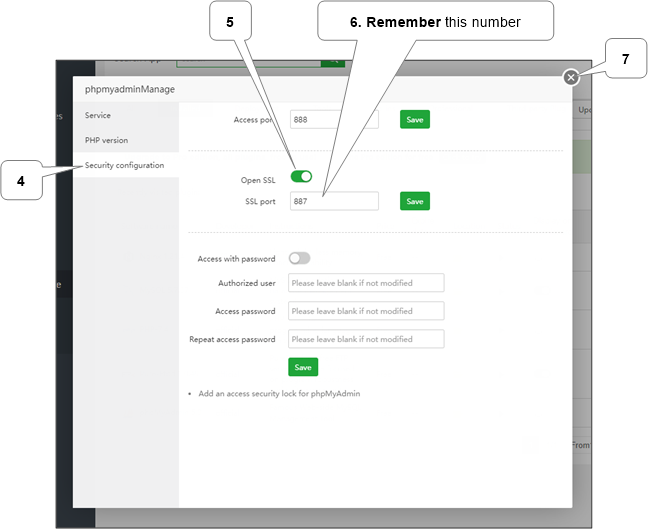
  4. Enable SSL for ‘phpMyAdmin’.

    aapanel-apps-phpmyadmin-settings

    aapanel-phpmyadmin-settings-security

    aapanel-security-add-phpmyadmin

  5. Add and configure site.

    Warning. If previous site is needed to be alive while configuring the new one, the SSL related setting mentioned below shouldn’t be used. So, SSL should be configured separately via site’s SSL settings by entering existed SSL certificate data in ‘Other certificate’ tab.
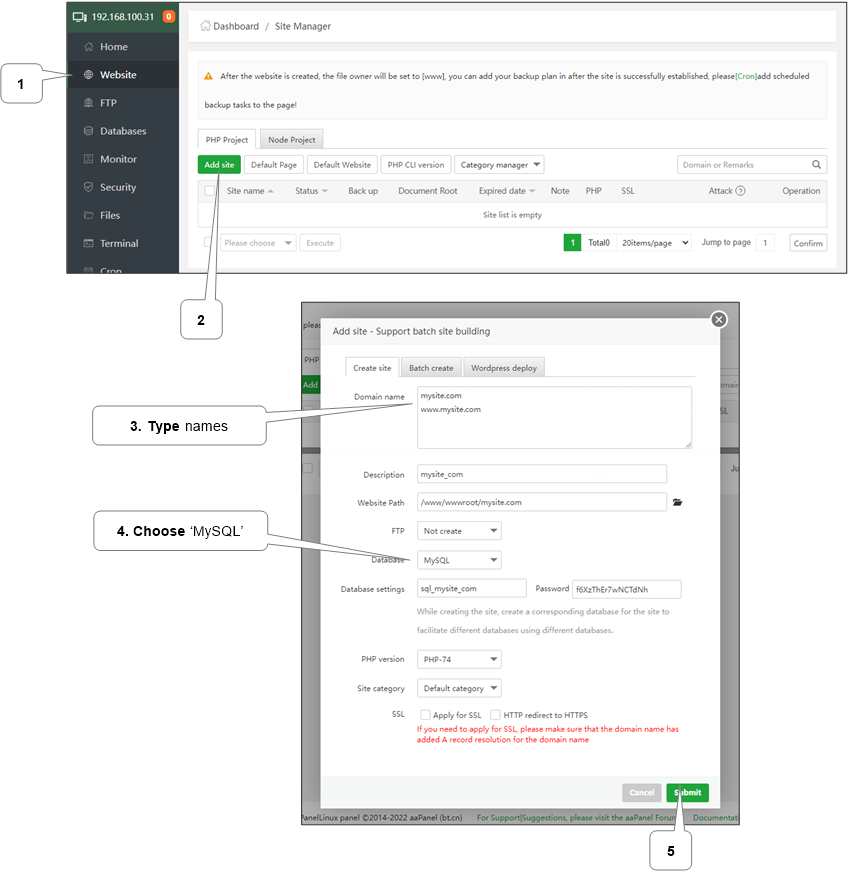
    aapanel-website-add

    If NGINX is used (it is by default) then setup WordPress rewrites.
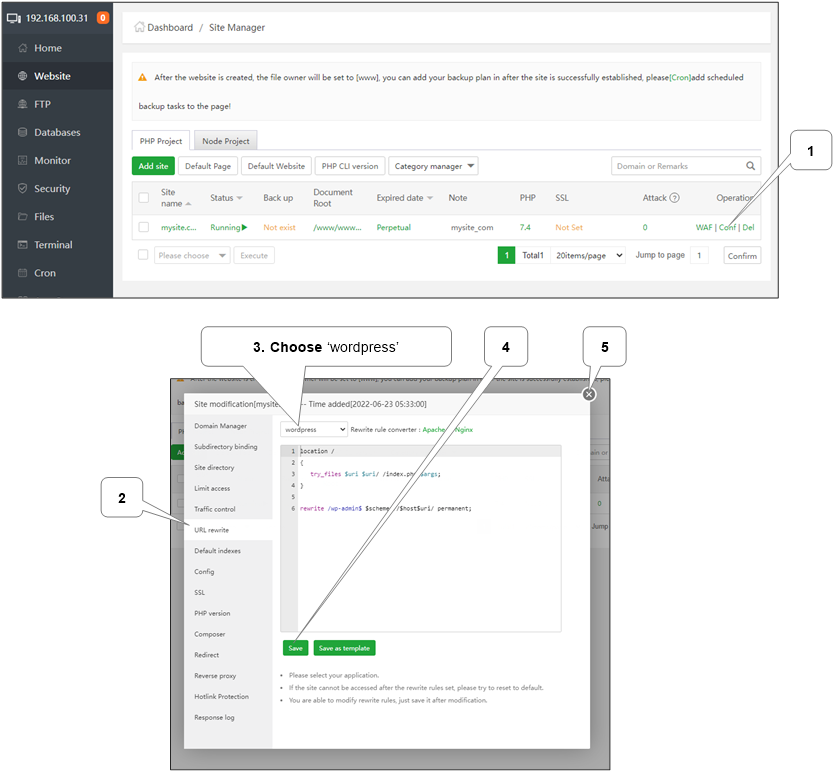
    aapanel-website-configure-rewrite

Deploy WordPress

Two ways:

Move or copy existed installation

It can be done by:

  • It is more complex but it allows to copy large database and files.

  • Using Duplicator or UpdraftPlus plugin

    It is simpler but there can be problems with copying large data due to PHP often has limits to file size and execution time.

Note. If new site doesn’t work then there will be a need to correct some configuration files and database tables that is out of scope of current manual due to complexity and variability of possible issues.

Manual mode

There will be needed a copy of site’s directory content as zip file e.g. files.zip (it should contain files like ‘wp-config.php’ and all other files from WordPress directory). Also, there will be needed a database copy as sql or sql.gz file e.g. database.sql.gz. It can be made manually of got from backup.

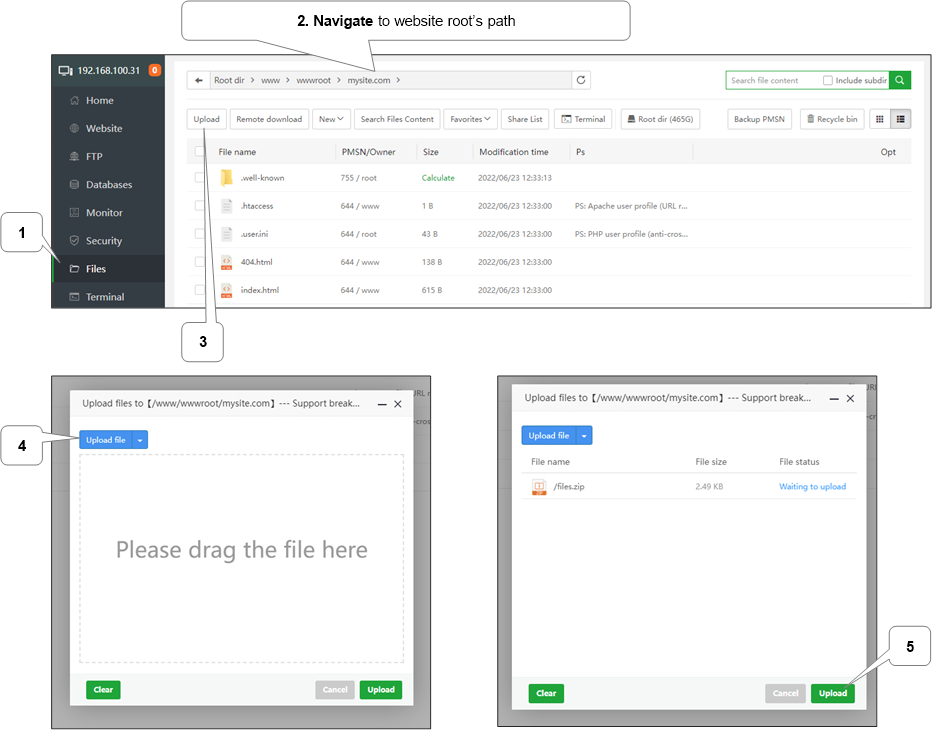
  • Upload files.zip file to our new website path.

    aapanel-files-sitepath-upload-wpfiles

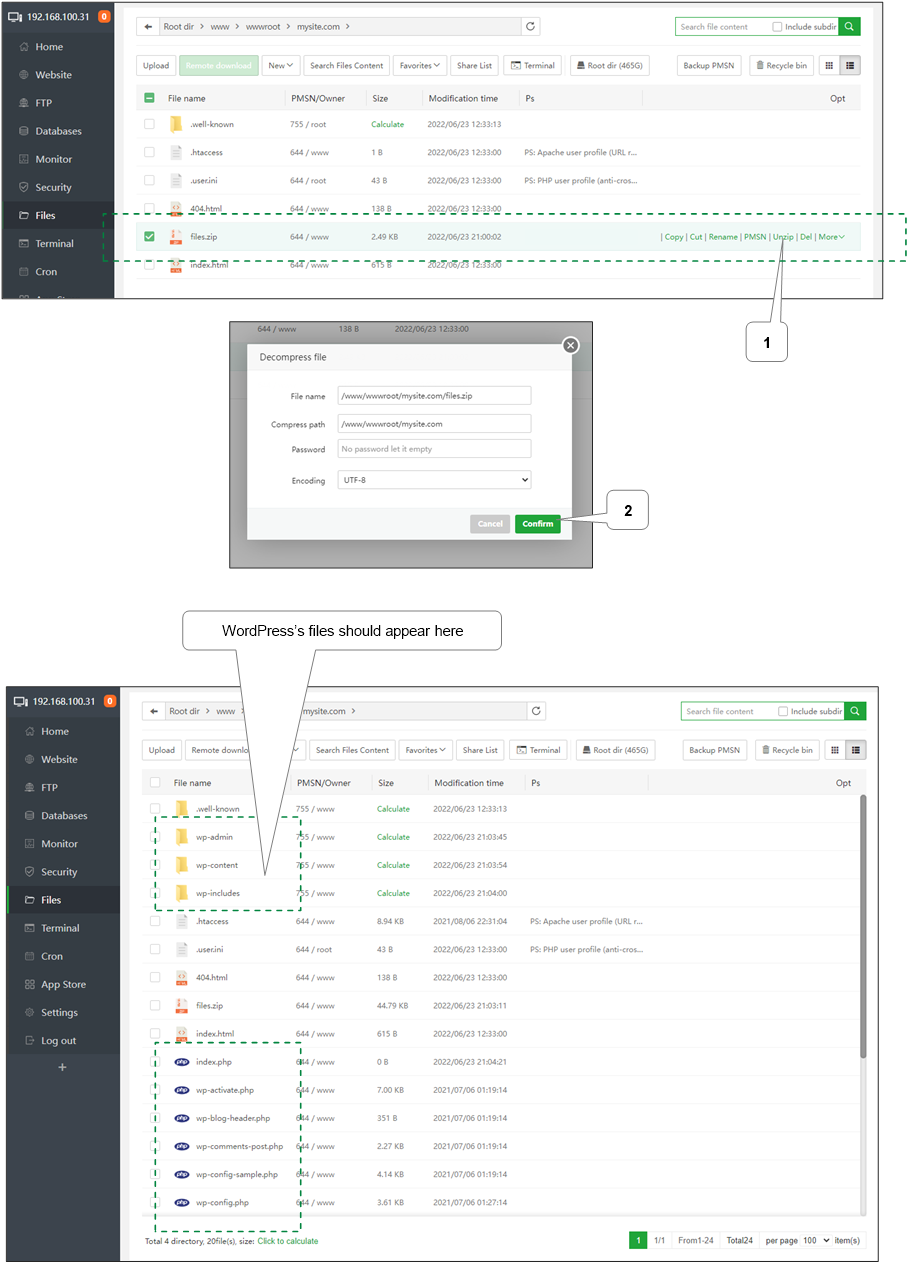
    Then, extract it.

    aapanel-files-sitepath-unzip-wpfiles

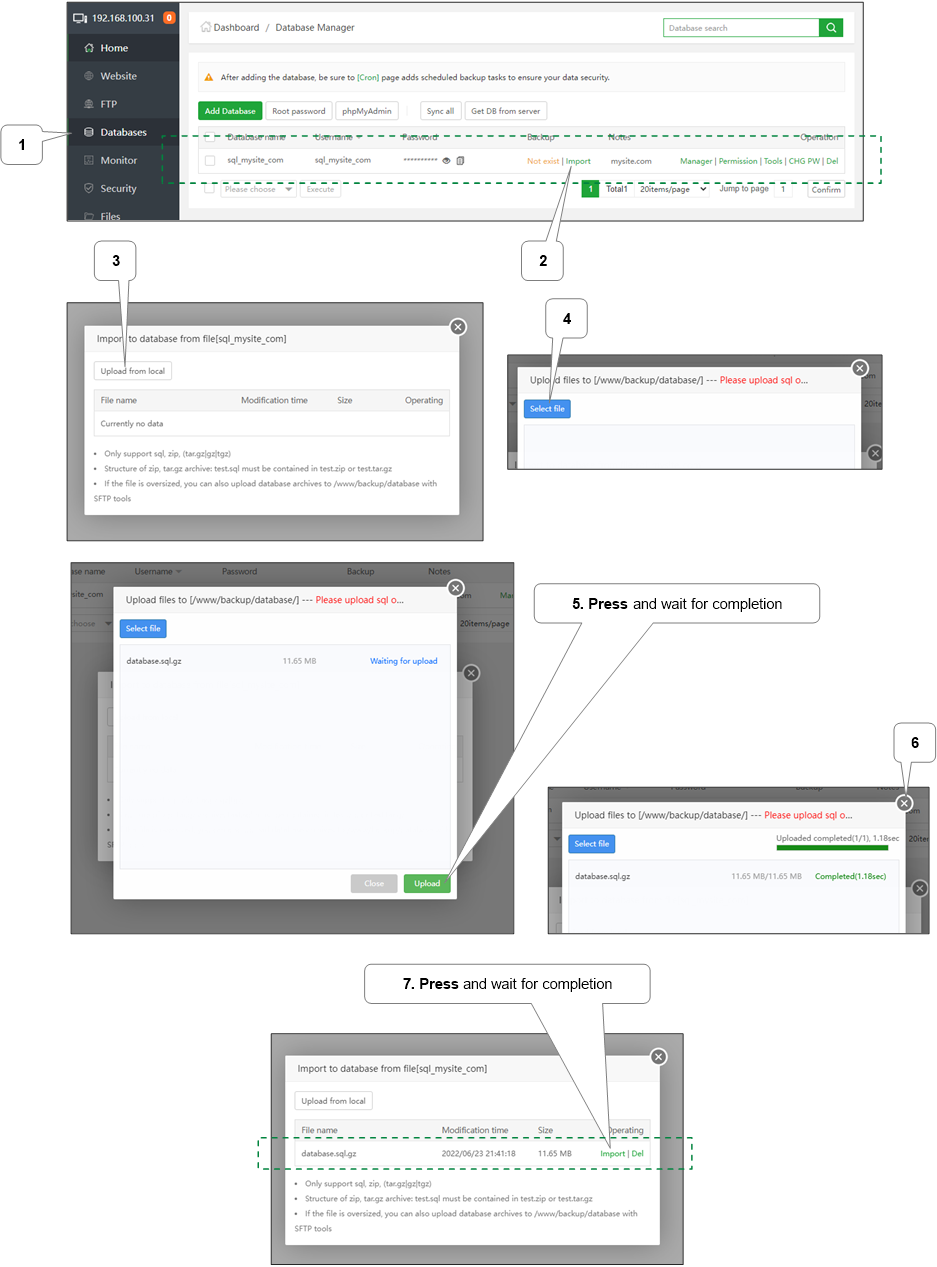
  • Import database database.sql.gz file. When importing is finished the window can be closed.

    aapanel-databases-site-import

Using Duplicator plugin

Download and install Duplicator plugin on the source site. Ensure that backup exists in source site or make it.

  • Now, just upload (as in manual mode) all created files to our new website path.
  • Then in browser run site’s name appended with installer.php e.g. https://mysite.com/installer.php and follow onscreen instructions.

Using UpdraftPlus plugin

Download and install UpdraftPlus plugin on the source site. Ensure that backup exists in source site or make it.

  • Create new WordPress destination installation and install UpdraftPlus plugin there.
  • Now, just upload (as in manual mode) all backed up data to our new website path under wp-config/updraft directory, e.g. /www/wwwroot/mysite.com/wp-config/updraft.
  • Finally, in destination site admin in ‘Settings -> UpdraftPlus Backups’ run searching new files and restore found backup.

New installation

  • Upload and extract (as in manual mode) needed ZIP WordPress archive to /www/wwwroot.
  • Then delete existing website directory (e.g. mysite.com) and rename wordpress directory to website directory’s name.
  • Then in browser open website name (e.g. https://mysite.com) and follow onscreen instructions.

Finish

If the previous site was kept alive while instilling the new one then now a temp DNS can be disabled and the new IP can be set in DNS settings.

More information can be discovered in the original post about Install VPS (Virtual private server) with WordPress and on the main site.

New version 2.10 released – Accelerator for WordPress

The new background images adaptation to screen sizes feature decreases images size on smaller screen sizes like mobiles. It is better to show smaller images on smaller screens to decrease network traffic and increase loading speed.

You can always see full change log of Accelerator for WordPress.

Last changes

New features

  • Background images adaptation to screen sizes.

Improvements

  • Auto-cleanup timeout has been increased from 30 to 182 days due to probable issue with Google Search Console.
  • User session cookie’s security (‘SameSite’ and ‘__Secure-‘ prefix).
  • VillaTheme WooCommerce Multi Currency support.

Fixes

  • Optimization requests can contain dots or commas in the timestamp parameter.

Download for free About product… 

More information can be discovered in the original post about New version 2.10 released – Accelerator for WordPress and on the main site.

Design a site like this with WordPress.com
Get started